

ShipServ is a maritime e-procurement platform connecting shipowners, ship managers and operators with marine suppliers. Founded in 1999, it supports digital sourcing and the exchange of purchasing documents, as described in ShipServ’s company overview.
How AVS Global Ship Supply supports ShipServ procurement
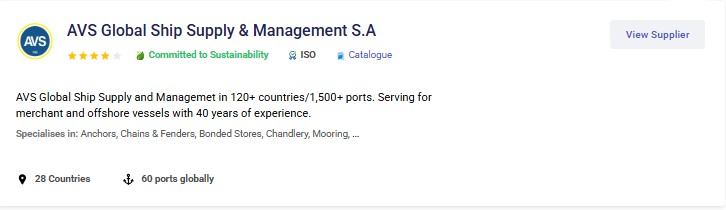
AVS Global Ship Supply quotes through ShipServ, Procureship and MESPAS, supporting vessels across 1,500+ ports in 126 countries. For global ship supply, include item descriptions, quantities, units, vessel name, port and ETA, with IMPA codes where available. Find AVS through its ShipServ supplier profile and confirm specifications, substitutions and delivery terms before ordering. See our single-contract ship supply guide for supply scope.
E-procurement can help purchasing teams organize sourcing and order records. The outcome still depends on clear requisitions, appropriate supplier selection and agreed delivery requirements. Platform access does not replace product checks, supplier approval or the buyer’s internal purchasing controls.
Who Uses ShipServ?
- Shipowners and operators: coordinating procurement across vessels and locations.
- Ship managers: managing purchasing and supplier relationships for their fleets.
- Chandlers and marine suppliers: presenting capabilities and responding to purchasing enquiries.
- Technical and purchasing teams: sourcing spare parts, provisions, stores and services.
Core Features of ShipServ
- Digital sourcing and purchasing: tools for finding suppliers and exchanging RFQs, quotations, purchase orders and confirmations.
- Supplier discovery: profiles that help buyers assess listed categories, locations and capabilities. Review the information and documents relevant to the actual requirement.
- Integration options: connections with procurement systems can reduce repeated data entry. Availability depends on the system, enabled services and implementation.
See ShipServ’s buyer solutions for its description of supplier search and digital trade.
Automated Transaction Flow on ShipServ
- Prepare the RFQ: define the item, specification, quantity, unit and required delivery location and timing.
- Receive and compare quotations: review prices alongside specifications, availability, exclusions and delivery terms.
- Issue the purchase order: record the agreed scope after the buyer’s approval.
- Obtain the order confirmation: check that the supplier’s confirmation matches the approved order.
- Maintain the transaction record: keep the relevant order, delivery and invoice documents together.
The ShipServ Order Management API supports the exchange of documents from RFQs through purchase order confirmations. Invoicing and other functions depend on the services and configuration in use.
Why E-Procurement Matters in Maritime Supply
- Less repeated administration: structured document exchange can reduce retyping and make purchasing correspondence easier to follow.
- Supplier access: search tools help teams identify suppliers for a required category and location. Availability and delivery feasibility still need confirmation.
- Comparable purchasing records: consistent specifications and units make quotations easier to review and support later analysis.
For an IMPA-coded RFQ, include the item description and relevant technical details as well as the code. Identify maker and part number where applicable, and state whether alternatives require approval. An item reference alone does not establish stock availability, exact suitability or an accepted substitution.
Benefits of Using ShipServ
- A shared digital channel for purchasing documents.
- More organized RFQ and quotation handling.
- Supplier information to support sourcing decisions.
- Transaction records that can support purchasing reviews.
- Integration options for suitable procurement systems.
These functions support procurement management; they do not guarantee the lowest price, a fixed response time or compliance of every listed product.
Common Pitfalls to Avoid
- Comparing the unit price while overlooking delivery charges, quantities, units or exclusions.
- Assuming a supplier listing proves approval for a particular product or brand.
- Sending an incomplete specification or omitting the vessel, port and ETA.
- Accepting substitutions without the responsible buyer’s or technical team’s approval.
- Assuming integrations or status updates are enabled without checking the actual setup.
Best Practices for Ship Managers
- Use your company’s supplier approval process alongside the platform’s profile information.
- Keep RFQ descriptions, quantities and units consistent across suppliers.
- Include the delivery port, vessel schedule and required documents.
- Record clarifications and approved alternatives before issuing the order.
- Compare the order confirmation with the approved purchase order.
- Reconcile receiving and invoice records through your normal purchasing controls.
For AVS enquiries, use the AVS ShipServ supplier profile to identify the supplier and review its listed capabilities. Keep the requisition and delivery requirements consistent whether the enquiry is sent through ShipServ or directly to AVS.
Frequently Asked Questions About ShipServ
What is ShipServ?
ShipServ is a maritime e-procurement platform that helps buyers find marine suppliers and exchange purchasing documents. Shipowners, ship managers and purchasing teams can use it to support sourcing and ordering. The supplier remains responsible for the goods or services offered, while the buyer reviews suitability and commercial terms.
How does ShipServ work?
A buyer prepares an RFQ, sends it to selected suppliers, reviews quotations and issues a purchase order after approval. The supplier then confirms the order. The available workflow depends on the buyer’s setup and enabled services; accurate item descriptions, quantities, units and delivery requirements remain essential throughout the process.
Who can join ShipServ?
ShipServ serves shipowners, ship managers, operators and marine suppliers, including chandlers and service providers. Registration, trading access and individual features depend on the relevant account and onboarding arrangements. Buyers should review each supplier’s profile, capabilities and documents rather than treating platform participation alone as proof of suitability for every order.
What are the costs of using ShipServ?
ShipServ advertises a free Trade Basic option for suppliers, alongside paid options with additional features. Buyer arrangements and integration requirements should be discussed with ShipServ. Confirm the current plan, included functions and applicable charges directly; do not assume that every participant pays a subscription or that every feature is free.
Is ShipServ secure?
ShipServ publishes information about its platform security and reliability measures. Buyers and suppliers should also maintain suitable account access, approval procedures and checks for unusual requests. Platform security does not replace the company’s purchasing controls or verification of changes to payment instructions, supplier details or order requirements.
Can ShipServ integrate with my fleet management system?
ShipServ offers integration options and APIs for exchanging purchasing documents with business systems. Compatibility and the available functions depend on the software, connector, plan and implementation. Confirm the specific system and document flow with ShipServ and your software provider before assuming automatic synchronization or live delivery-status updates.
How does ShipServ benefit suppliers?
Suppliers can use ShipServ to present their capabilities, receive RFQs and manage quotations and orders through the services enabled for their accounts. AVS Global Ship Supply is listed on ShipServ and quotes through the platform. A complete RFQ helps the supplier assess the requirement and clarify specifications before order acceptance.
For current supplier plans, consult ShipServ Trade. For platform security information, see ShipServ’s security overview.
Next Step: Send a Complete Supply Enquiry
Send your requisition or IMPA-coded list with item descriptions, quantities, units, vessel name, delivery port and ETA. Include technical specifications, required documents and any restrictions on substitutions so AVS can review the supply requirement.